Every agent.
At a glance.
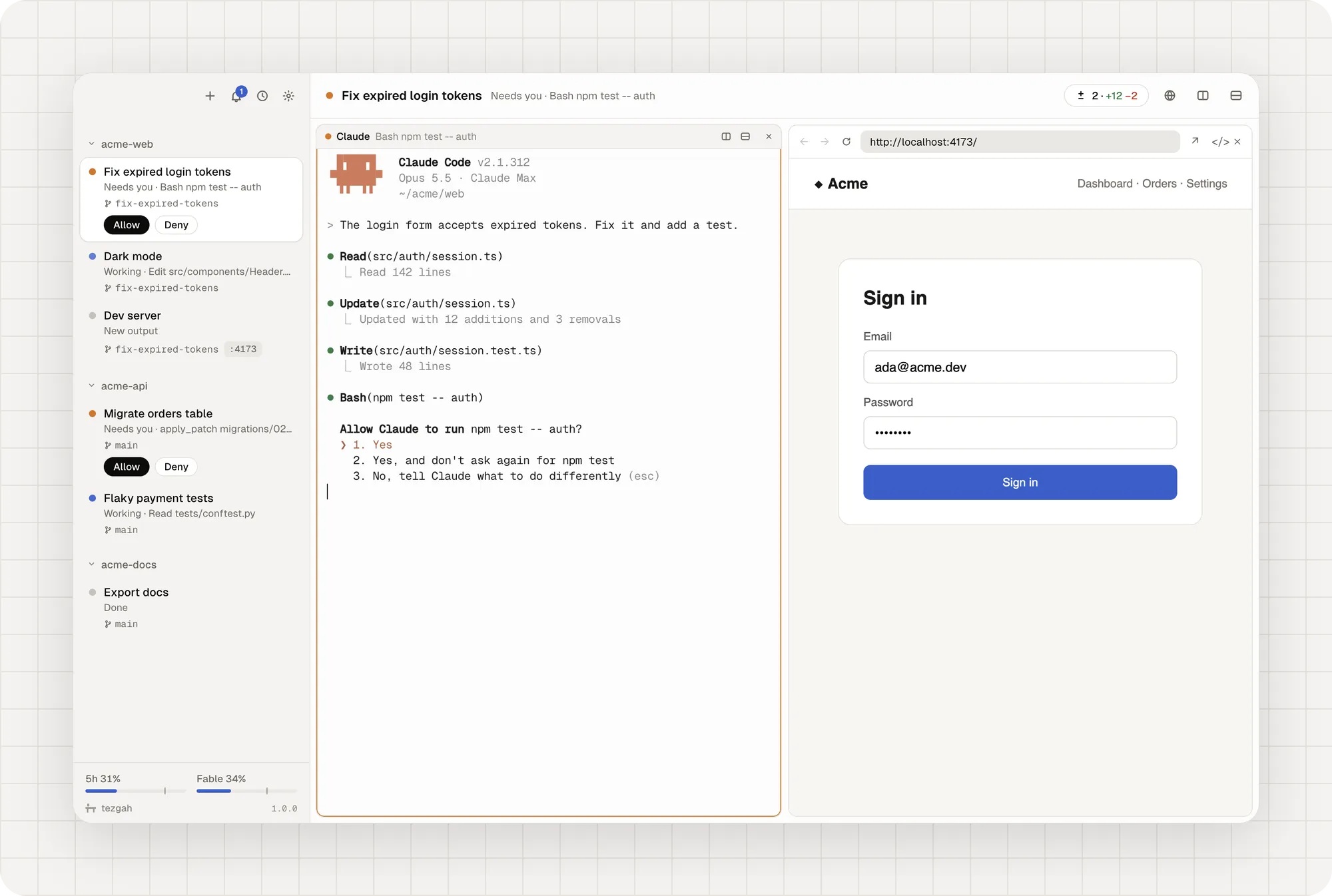
Tezgah is a terminal for working with AI coding agents. Your projects sit in a sidebar with the sessions you run in each one, and every agent shows what it’s doing: working, waiting for you, done.
 123
123Works with the agents you already use
- Claude Code
- Codex
- Gemini
- Grok
- Aider
- OpenCode
- Amp
Status
Know where to look
Claude Code reports its state itself; Codex through hooks Tezgah passes when you run it; Gemini, Grok, Aider, OpenCode and others are read from what they do. No setup, no config to edit.
- Working, Needs you, Done with what each agent is doing right now.
- Subagents listed under their session, each one followable as it works.
- What’s running where the git branch, the ports its programs listen on and its pull request.
Permissions
Answer without switching
When an agent asks to run a command, allow or deny it right from the sidebar. A ring marks the pane that needs you, the bell counts what you missed, and the menu bar shows who’s waiting.
DocsBrowser
A browser your agents can use
Open your dev server beside the terminal. Agents read the page as text with element refs, click, fill forms, take screenshots and check the console, so they can try what they built.
Claude gets these tools automatically. Any agent can use them through the tezgah command or MCP. Docs
Changes
Review, commit, ship
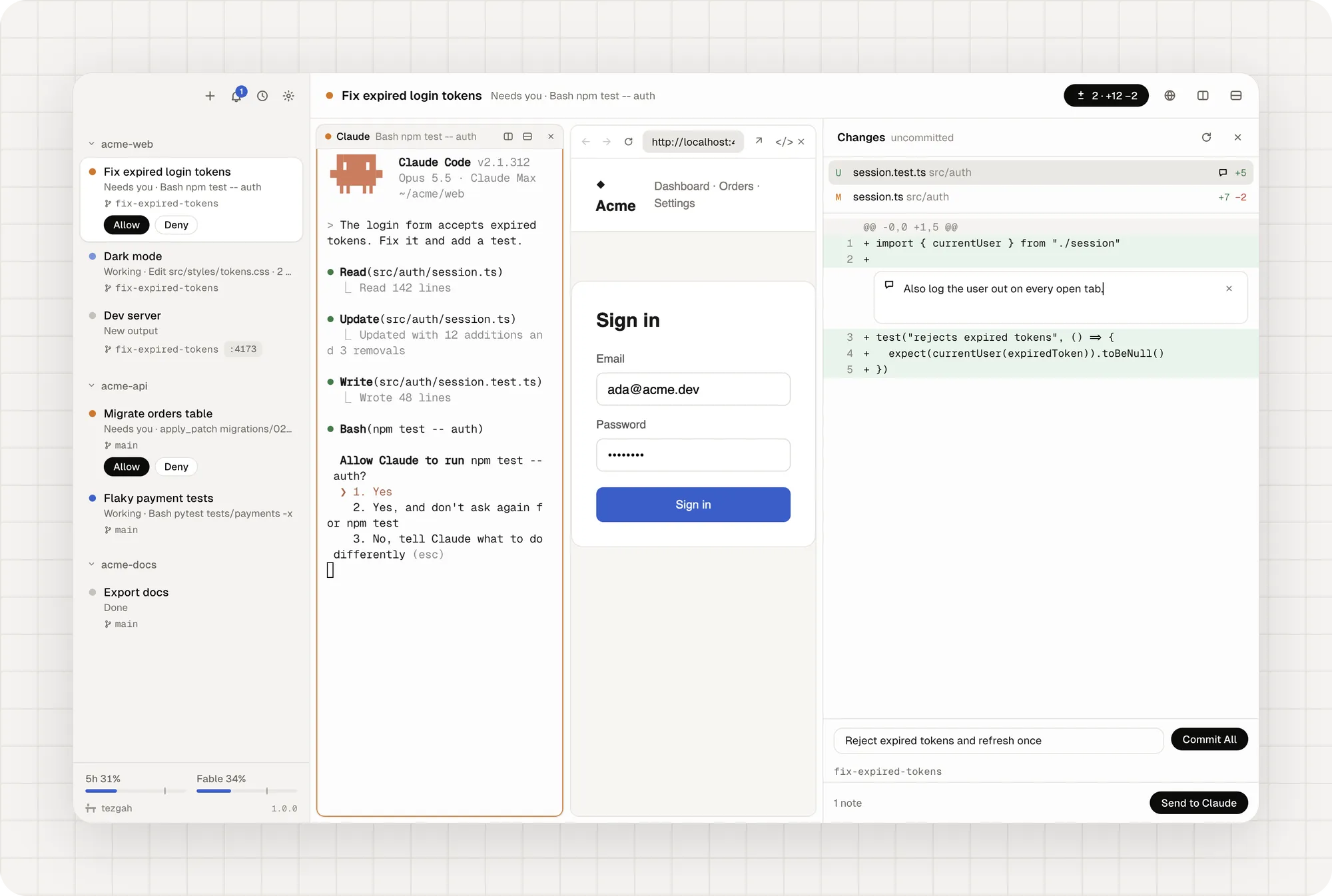
See every change the session made, click a line to leave a note, and send all your notes to Claude in one message. Then commit, push and open a pull request from the same panel.
Everything else
Made to be at home in
Use it as your everyday terminal too. The details are what make it feel like a workbench.
Conversations that resume
Sessions are pinned to their Claude conversation, and shell panes keep their screen across relaunches.
Split panes & layouts
Split right or down, save a layout, open it again with one click.
Worktree sessions
Give parallel agents their own branch and folder so they never collide, then merge.
Plan limits
Claude and Codex limits at the bottom of the sidebar, context and tokens in each header.
SSH sessions
Connect to any host from your ssh config. Dropped files upload to the server.
Quick switcher
Jump to any session, archived ones too, or run your own commands.
Every shortcut yours
Change any shortcut in Settings. Conflicts are caught for you.
Drop & paste files
Drop or paste files and screenshots into a pane as paths.
Türkçe & English
Light and dark themes, Geist type, colors from your Ghostty config.
The tezgah command
Scriptable from every pane
Every terminal inside Tezgah has a tezgah command. It needs nothing installed and talks to the app over a socket only your user can open. Agents that speak MCP can add tezgah mcp as a server.
Read the reference$ tezgah browser open http://localhost:5173# open your app beside the terminal$ tezgah browser snapshot# the page as text, with refs$ tezgah browser click "text=Sign in"# a ref, a CSS selector, or text=…$ tezgah notify --title Build "tests passed"# notification, ring and panel entry$ tezgah status working "deploying"# this pane’s status in the sidebar$ tezgah split down -- npm run dev# a new pane beside this one$ tezgah send --enter "run the tests again"# type into this session’s Claude$ Blog
What’s new
- Releasev1.0.3
Tezgah 1.0.3: updates install themselves
New versions now download in the background and go in place when you quit Tezgah, or right away with Restart in the sidebar.
Read - Releasev1.0.2
Tezgah 1.0.2: pasting works again
A fix for pasting text, links, files and images, which stopped working in 1.0.1, and pasting into pages in a browser pane.
Read - Releasev1.0.1
Tezgah 1.0.1: your everyday terminal
Open folders with Tezgah from Finder, Explorer or your file manager, and make it the terminal your desktop opens for shell scripts and ssh:// links.
Read - Releasev1.0.0
Introducing Tezgah 1.0
A terminal for working with AI coding agents, rebuilt from scratch for macOS, Windows and Linux. Every agent, and what it's doing, at a glance.
Read
Yours, and only yours
0 telemetry
No analytics, no tracking, no account. It only asks GitHub for new versions.
MIT license
Free and open source. Read every line, build it yourself.
3 platforms
One app for macOS, Windows and Linux, built on Electron and xterm.js.
Put your agents on one bench
Tezgah is free. You need Claude Code for Claude sessions; shell sessions and other agents work without it.
v1.0.3 · Builds aren’t signed yet. On macOS, right-click Tezgah in Applications and choose Open the first time; on Windows choose More info → Run anyway.
All downloads · Build from source