Docs / Browser & git
The browser
Open web pages beside the terminal, and let Claude and other agents read, click, fill and screenshot them with Tezgah's browser tools.
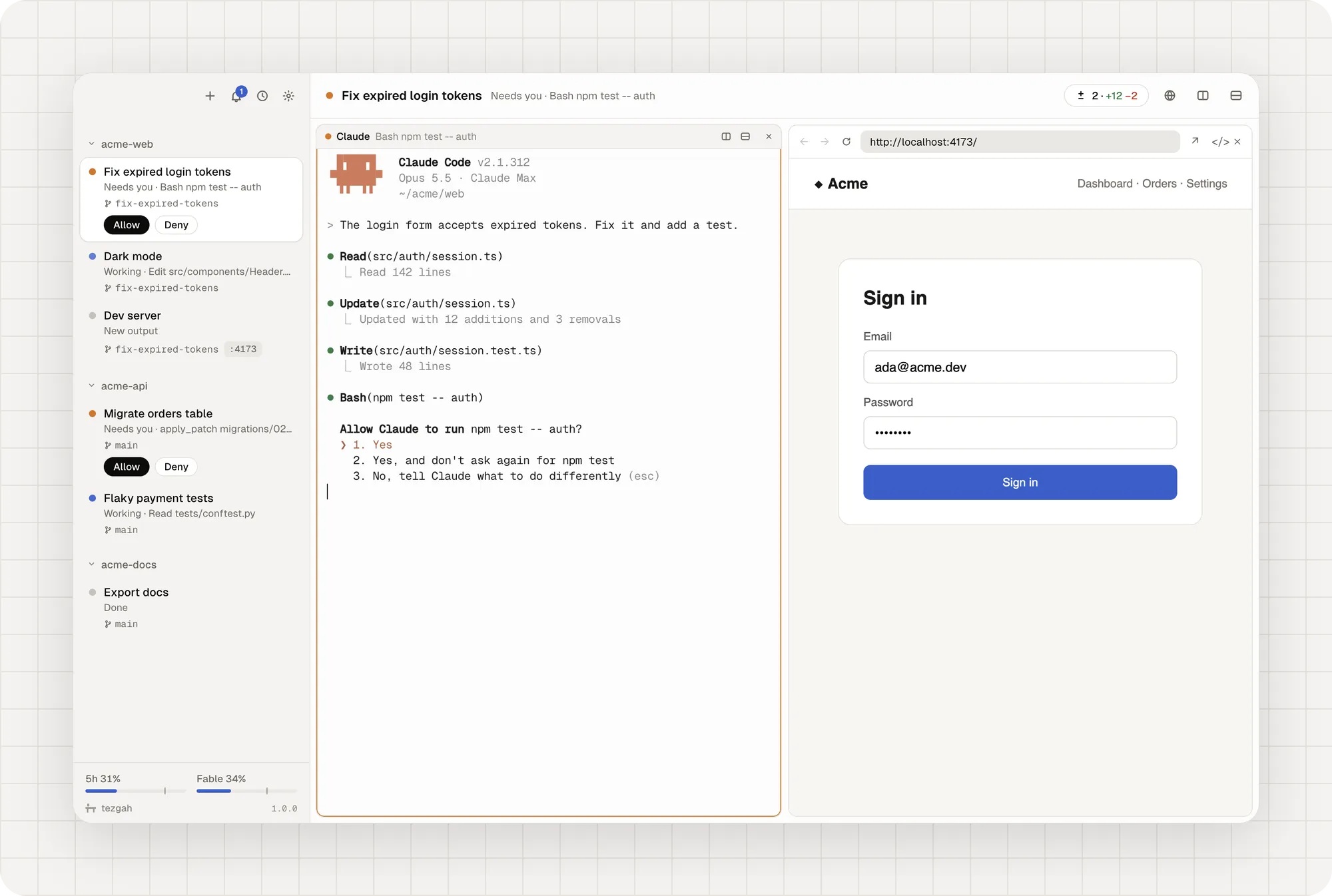
Browser panes
Open a browser pane with ⇧⌘L (Ctrl+Shift+Y) or the globe button in a session’s header. If the session runs a dev server, it opens on that port. Click a port under a session in the sidebar to open it too.
A browser pane has back, forward and reload, an address bar, a button to open the page in your own browser, and developer tools. It keeps running while you look at other sessions.
Agents can use it
Agents read the page as text, with a ref like e12 for each link, button and field, then act on it with real mouse and keyboard input. They can check what they built without you.
Ask Claude to “open the app and check the sign-in form” and it can:
| Tool | What it does |
|---|---|
browser_open |
Open a URL in the session’s browser pane and wait for it to load |
browser_snapshot |
The page as text, each link, button and field with a ref (e12) |
browser_click, browser_fill, browser_type, browser_press, browser_select, browser_hover, browser_scroll |
Act on the page with real mouse and keyboard input |
browser_screenshot |
See the page or one element as an image |
browser_wait |
Wait for text, a selector, a URL or the page to load |
browser_console, browser_network |
What the page logged, and the requests it made (failed ones too) |
browser_eval, browser_navigate |
Run JavaScript; back, forward, reload |
terminal_read, terminal_send, terminal_split |
Read or type into other panes, or start a dev server beside you |
tezgah_list, tezgah_notify |
Sessions and panes; notify you |
A target is a ref from the latest snapshot (e12), a CSS selector, or text=<visible text>.
Claude gets them automatically
Claude sessions started by Tezgah get these tools through an MCP config passed to that session only. Your Claude settings aren’t changed. Turn it off in Settings → Browser and pane tools for Claude.
Other agents
Any agent that runs shell commands can use the tezgah command with no setup:
tezgah browser open http://localhost:5173
tezgah browser snapshot
tezgah browser fill text=Email ada@example.com
tezgah browser click "text=Sign in"
tezgah browser wait --text "Welcome"
tezgah browser console --errors
For agents that speak MCP, add tezgah mcp as a server:
# Codex: ~/.codex/config.toml
[mcp_servers.tezgah]
command = "tezgah"
args = ["mcp"]
// Gemini CLI: ~/.gemini/settings.json
{ "mcpServers": { "tezgah": { "command": "tezgah", "args": ["mcp"] } } }The tezgah command exists only inside Tezgah’s terminals, so these servers start when the agent runs in Tezgah.